When you use Bootstrap for your project, you usually end up with a lot of unused CSS. The full Bootstrap CSS bundle is around 225 KB which is quite heavy for most projects that only use a fraction of the available components. In this post, we’ll walk through how to set up a Bootstrap 5 project with Parcel and then use PurgeCSS to strip out the unused CSS, bringing the bundle size down to around 5.7 KB.
Prerequisites
- Node.js installed on your machine.
- Basic familiarity with npm and JavaScript build tools.
Setting up Bootstrap 5 with Parcel
First, let’s create a new project and install the required dependencies.
mkdir bs5-parcel && cd bs5-parcel
npm init -y
Install the dependencies:
npm install bootstrap @popperjs/core express compression
npm install --save-dev parcel @parcel/transformer-js @parcel/transformer-sass @parcel/transformer-svg @fullhuman/postcss-purgecss
Project Structure
Set up the following project structure:
bs5-parcel/
├── src/
│   ├── js/
│   │   └── main.js
│   ├── scss/
│   │   └── styles.scss
│   └── index.html
├── index.js
├── .parcelrc
├── purgecss.config.js
└── package.json
Configure Parcel
Create a .parcelrc file in the project root to configure Parcel’s transformers for SCSS and SVG:
{
   "extends": "@parcel/config-default",
   "transformers": {
       "scss": ["@parcel/transformer-sass"],
       "svg": ["@parcel/transformer-svg"]
   }
}
Import Bootstrap SCSS Selectively
Create src/scss/styles.scss and import only the Bootstrap components you need. This is the first step of optimization, importing only what’s required:
@import "bootstrap/scss/mixins/banner";
@include bsBanner("");

// Configuration
@import "bootstrap/scss/functions";
@import "bootstrap/scss/variables";
@import "bootstrap/scss/variables-dark";
@import "bootstrap/scss/maps";
@import "bootstrap/scss/mixins";
@import "bootstrap/scss/utilities";

// Layout & components
@import "bootstrap/scss/root";
@import "bootstrap/scss/reboot";
@import "bootstrap/scss/type";
@import "bootstrap/scss/images";
@import "bootstrap/scss/containers";
@import "bootstrap/scss/grid";
@import "bootstrap/scss/tables";
@import "bootstrap/scss/buttons";
@import "bootstrap/scss/dropdown";
@import "bootstrap/scss/nav";
@import "bootstrap/scss/card";

// Helpers
@import "bootstrap/scss/helpers";

// Utilities
@import "bootstrap/scss/utilities/api";
Set up the JavaScript Entry Point
Create src/js/main.js to import any Bootstrap JS you need:
// Import only the Bootstrap JS components you need
import { Dropdown } from 'bootstrap/js/src/dropdown';
Note that with Parcel, the SCSS is linked directly from the HTML file rather than imported through JavaScript.
Create the HTML Page
Create src/index.html with your page content. Link the SCSS file directly in the HTML head:
<link rel="stylesheet" href="./scss/styles.scss">
For this example, we’ll use the Bootstrap Pricing example template which includes cards, tables, navs, dropdowns, and a footer. Import the JavaScript at the bottom of the body:
<script type="module" src="./js/main.js"></script>
Set up Express for Testing
Create index.js in the project root to serve the built files with compression:
const express = require('express');
const compression = require('compression');

const app = express();
const port = 3000;

app.use(compression());
app.use(express.static('dist'));

app.listen(port, () => {
    console.log(`Server is running on port ${port}`);
});
Update package.json Scripts
Add the following scripts to your package.json:
{
  "scripts": {
    "start": "parcel serve src/index.html --public-url / --dist-dir dist",
    "build": "parcel build src/index.html --public-url / --dist-dir dist",
    "optimize-css": "purgecss --config purgecss.config.js --output dist/",
    "express": "node index.js",
    "test": "echo \"Error: no test specified\" && exit 1"
  }
}
Build and Check Initial Bundle Size
With everything set up, run the following command to build your project and start the Express server:
npm run build && npm run express
Visit the page at http://localhost:3000 , right-click, select “inspect,” and navigate to the network tab in the Inspector. Upon refreshing the page, you should see the CSS bundle size, which should be around 225 KB.
Configure PurgeCSS (with caution)
PurgeCSS is a valuable tool for eliminating unused CSS from your project. Before using PurgeCSS make sure that you are very well aware of which classes and components are required. Because PurgeCSS will most likely remove some other state-related classes like dropdown states and animations.
PurgeCSS looks for a list of classes used in your HTML and based on that removes those that aren’t used. This is where you need to use a safelist to fine-tune things according to your usage.
With Parcel, we use PurgeCSS as a separate CLI step (rather than a bundler plugin). Create a purgecss.config.js in the project root:
module.exports = {
    content: ['./src/**/*.html'],
    css: ['./dist/**/*.css'],
    safelist: {
        deep: [/dropdown-menu$/]
    },
};
Explanation:
- content: tells PurgeCSS which files to scan for CSS class usage. Here we scan all HTML files in
src/. - css: points to the built CSS files in
dist/that PurgeCSS should process. - safelist: the
deeprule with/dropdown-menu$/ensures dropdown-related classes are preserved, since they are dynamically added by Bootstrap’s JavaScript and won’t appear in the static HTML.
You may need to customize the safelist according to your specific needs. For more details, check the PurgeCSS documentation .
Run the Optimization
Now, let’s run the following commands in the order:
npm run buildthis will build the files with the Parcel bundler.npm run optimize-cssthis will purge any CSS that is not used in the HTML.
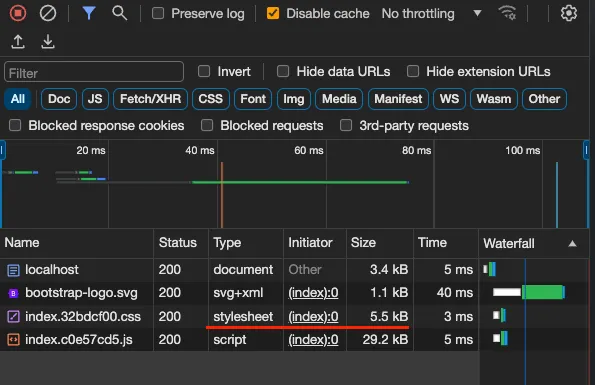
Finally, to check the final bundle size: npm run express. Then check the final bundle size in Inspector should be around 5.7 KB. (You may have to do shift+refresh in Chrome).
Conclusion
In conclusion, optimizing your Bootstrap project by removing unused CSS can significantly reduce your bundle size. By following the steps outlined in this post, you can achieve a much smaller production bundle. Initially, the CSS bundle size was around 225 KB, but after implementing PurgeCSS and the necessary configurations, the final bundle size was reduced to a lean 5.7 KB.
This level of optimization can greatly enhance the performance of your web application, ensuring that only the necessary styles are included in your production code. For more details and access to the complete source code, please refer to the GitHub repository provided.